Security scans
An agent scan reads one GitHub or GitLab repository. It records findings for that repository.
You need a connected GitHub or GitLab integration.
Inputs
The New agent scan form collects the scan target and the run time.
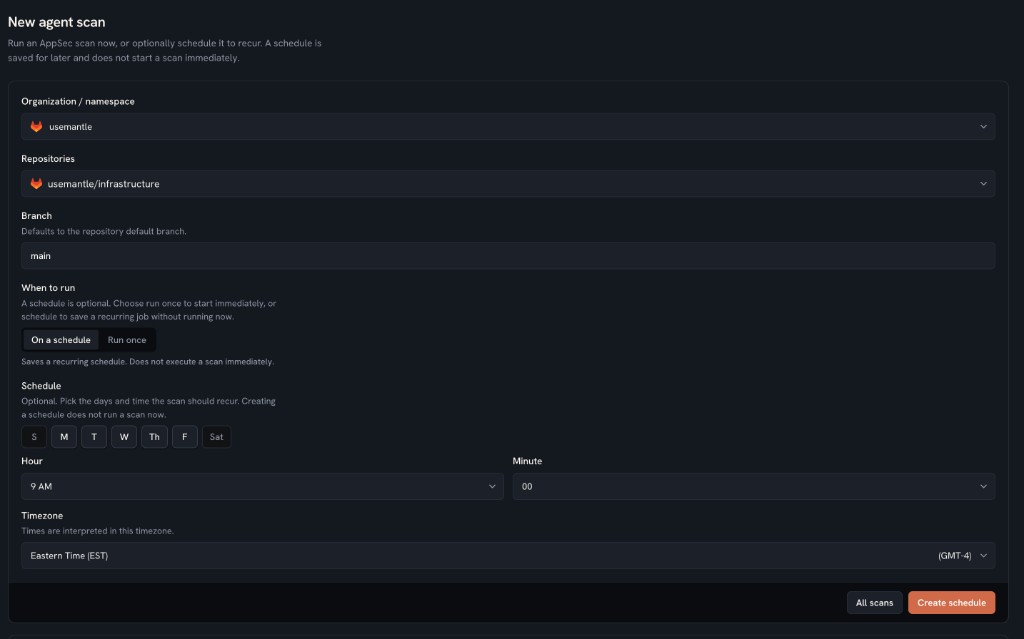
Required fields:
- Organization or namespace. Select a connected GitHub organization or GitLab namespace.
- Repository. Select one repository. The form does not start a scan of many repositories. a. We are working on support for cross repository scans.
- Branch. The form uses the repository default branch unless you enter a different value. If the API omits branch, the backend uses
main. - When to run. Choose Run once or On a schedule.
Run once starts a scan now. The trigger is manual.
On a schedule stores a recurring job. It does not start a scan now. Later runs use trigger scheduled.
Schedule fields:
- Days
- Hour
- Minute
- Timezone
The backend stores the schedule as a cron expression. The cron must fire at most once per 24 hours. If you omit timezone, the backend uses the organization default timezone. If that value is empty, the backend uses UTC.
Optional advanced fields:
- Model
- Input token budget
- Output token budget
- Prompt
A token budget of 0 is rejected.
Outputs
A run-once request returns a scan record. Status starts as pending, then running.
Final status is one of:
succeededfailedcancelled
The scan record includes:
- repository owner and name
- branch
- commit SHA after the scan reads the repository
- findings created
- trigger (
manualorscheduled) - error message if the scan fails
The scan detail page also lists:
- files the scan evaluated, with the last commit SHA for each file
- findings with title, severity, status, and class ID
Finding source is appsec_agent. Finding status is open or resolved. Severity is info, low, medium, high, critical, or unknown.
A finding may include a remediation with a pull request URL.
Only one scan may run on the same repository at a time. Use Interrupt on a pending or running scan to stop it.
More information
For the scan workflow, read Deep dive into the Mantle architecture.